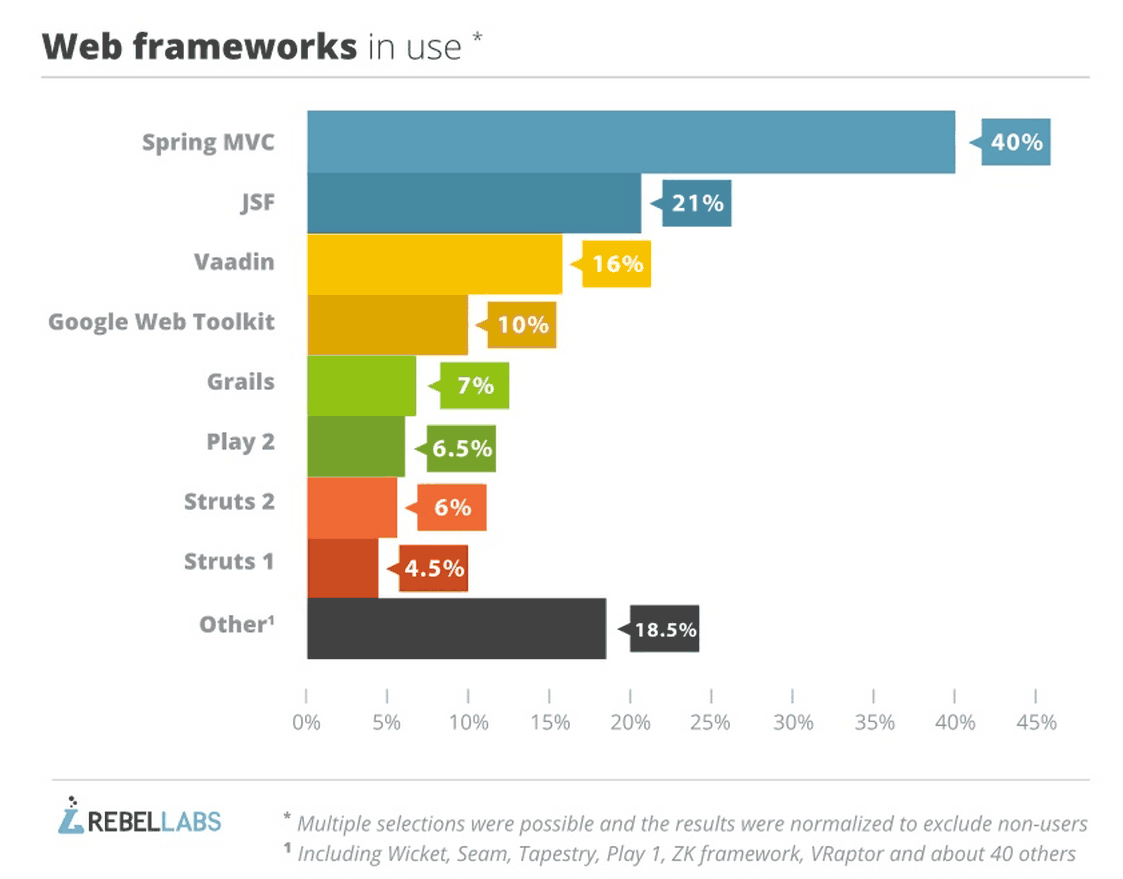
Whether you like it or not, Spring MVC is by far the most popular and used web framework for Java. It is important to recognize this popularity and its reputation. It’s one of the most favored framework by federal agencies because of the fact that it is Java-based means
“enterprise-ready” and that carries a lot of value. It’s an implication of stability, reliability, and support. This blog will attempt to help new Spring MVC developers by presenting a sensible project structure for the framework.
This article is a step by step guide for User Registration and Login using the below tools and technologies.
1. Spring Framework (Core, MVC & JDBC)
2. Java 1.8
3. Maven 3.3.9
4. Eclipse IDE (Mars2)
5. MySQL 5.1
Step 1: Create a Maven Project
Using Eclipse IDE, create a Maven Project by selecting Web Archetype.
Step 2: Update Pom.xml
Update your maven dependencies.
<project xmlns="http://maven.apache.org/POM/4.0.0" xmlns:xsi="http://www.w3.org/2001/XMLSchema-instance" xsi:schemaLocation="http://maven.apache.org/POM/4.0.0 http://maven.apache.org/maven-v4_0_0.xsd">
<modelVersion>4.0.0</modelVersion>
<groupId>jbr</groupId>
<artifactId>SpringMvcUser</artifactId>
<packaging>war</packaging>
<version>0.1</version>
<name>SpringMvcUser Maven Webapp</name>
<url>http://maven.apache.org</url>
<properties>
<project.build.sourceEncoding>UTF-8</project.build.sourceEncoding>
<spring.version>4.3.2.RELEASE</spring.version>
<junit.version>4.12</junit.version>
<servlet.version>3.1.0</servlet.version>
<servlet.version>3.0.1</servlet.version>
<mysql.connector.version>5.1.9</mysql.connector.version>
</properties>
<dependencies>
<!-- Junit -->
<dependency>
<groupId>junit</groupId>
<artifactId>junit</artifactId>
<version>${junit.version}</version>
<scope>test</scope>
</dependency>
<!--Servlet-Api -->
<dependency>
<groupId>javax.servlet</groupId>
<artifactId>javax.servlet-api</artifactId>
<version>${servlet.version}</version>
</dependency>
<!-- Spring Framework -->
<dependency>
<groupId>org.springframework</groupId>
<artifactId>spring-core</artifactId>
<version>${spring.version}</version>
</dependency>
<dependency>
<groupId>org.springframework</groupId>
<artifactId>spring-beans</artifactId>
<version>${spring.version}</version>
</dependency>
<dependency>
<groupId>org.springframework</groupId>
<artifactId>spring-context</artifactId>
<version>${spring.version}</version>
</dependency>
<dependency>
<groupId>org.springframework</groupId>
<artifactId>spring-jdbc</artifactId>
<version>${spring.version}</version>
</dependency>
<dependency>
<groupId>org.springframework</groupId>
<artifactId>spring-test</artifactId>
<version>${spring.version}</version>
<scope>test</scope>
</dependency>
<dependency>
<groupId>org.springframework</groupId>
<artifactId>spring-webmvc</artifactId>
<version>${spring.version}</version>
</dependency>
<!-- Servlet API -->
<dependency>
<groupId>javax.servlet</groupId>
<artifactId>javax.servlet-api</artifactId>
<version>${servlet.version}</version>
</dependency>
<!-- MySQL database driver -->
<dependency>
<groupId>mysql</groupId>
<artifactId>mysql-connector-java</artifactId>
<version>${mysql.connector.version}</version>
</dependency>
</dependencies>
<build>
<finalName>SpringMvcUser</finalName>
</build>
</project>
Step 3: Update web.xml
Update the web.xml under src/main/webapp/WEB-INF as shown below:
<web-app xmlns:xsi="http://www.w3.org/2001/XMLSchema-instance" xmlns="http://java.sun.com/xml/ns/javaee" xsi:schemaLocation="http://java.sun.com/xml/ns/javaee http://java.sun.com/xml/ns/javaee/web-app_3_0.xsd" version="3.0">
<display-name>Archetype Created Web Application</display-name>
<welcome-file-list>
<welcome-file>home.jsp</welcome-file>
</welcome-file-list>
<servlet>
<servlet-name>spring-mvc</servlet-name>
<servlet-class>org.springframework.web.servlet.DispatcherServlet</servlet-class>
<load-on-startup>1</load-on-startup>
</servlet>
<servlet-mapping>
<servlet-name>spring-mvc</servlet-name>
<url-pattern>/</url-pattern>
</servlet-mapping>
</web-app>
-
DispatcherServletis the root Servlet for any Servlet defined in your application. It will redirect the request made to the application to the appropriate controller based on the URL. -
spring-mvcis the name of the root servlet and Spring container will look for the configuration with this name. So the next step is to create a spring configuration with spring-mvc-servlet.xml.
Step 4: Create spring-mvc-servlet.xml
Create
spring-mvc-servlet.xml under the src/main/webapp/WEB-INF folder and define the beans.
<beans xmlns="http://www.springframework.org/schema/beans" xmlns:context="http://www.springframework.org/schema/context" xmlns:xsi="http://www.w3.org/2001/XMLSchema-instance" xsi:schemaLocation=" http://www.springframework.org/schema/beans http://www.springframework.org/schema/beans/spring-beans-3.0.xsd http://www.springframework.org/schema/context http://www.springframework.org/schema/context/spring-context-3.0.xsd">
<import resource="classpath:jbr/config/user-beans.xml" />
<context:component-scan base-package="jbr.springmvc" />
<context:annotation-config />
<bean class="org.springframework.web.servlet.view.InternalResourceViewResolver">
<property name="prefix" value="/jsp/" />
<property name="suffix" value=".jsp" />
</bean>
</beans>
Step 5: Create Controllers
Create Separate Controllers for User Registration and Login as below.
Create a package
jbr.springmvc.controller RegistrationController.java
package jbr.springmvc.controller;
import javax.servlet.http.HttpServletRequest;
import javax.servlet.http.HttpServletResponse;
import org.springframework.beans.factory.annotation.Autowired;
import org.springframework.stereotype.Controller;
import org.springframework.web.bind.annotation.ModelAttribute;
import org.springframework.web.bind.annotation.RequestMapping;
import org.springframework.web.bind.annotation.RequestMethod;
import org.springframework.web.servlet.ModelAndView;
import jbr.springmvc.model.User;
import jbr.springmvc.service.UserService;
public class RegistrationController {
public UserService userService;
(value = "/register", method = RequestMethod.GET)
public ModelAndView showRegister(HttpServletRequest request, HttpServletResponse response) {
ModelAndView mav = new ModelAndView("register");
mav.addObject("user", new User());
return mav;
}
(value = "/registerProcess", method = RequestMethod.POST)
public ModelAndView addUser(HttpServletRequest request, HttpServletResponse response,
("user") User user) {
userService.register(user);
return new ModelAndView("welcome", "firstname", user.getFirstname());
}
}
LoginController.java
package jbr.springmvc.controller;
import javax.servlet.http.HttpServletRequest;
import javax.servlet.http.HttpServletResponse;
import org.springframework.beans.factory.annotation.Autowired;
import org.springframework.stereotype.Controller;
import org.springframework.web.bind.annotation.ModelAttribute;
import org.springframework.web.bind.annotation.RequestMapping;
import org.springframework.web.bind.annotation.RequestMethod;
import org.springframework.web.servlet.ModelAndView;
import jbr.springmvc.model.Login;
import jbr.springmvc.model.User;
import jbr.springmvc.service.UserService;
public class LoginController {
UserService userService;
(value = "/login", method = RequestMethod.GET)
public ModelAndView showLogin(HttpServletRequest request, HttpServletResponse response) {
ModelAndView mav = new ModelAndView("login");
mav.addObject("login", new Login());
return mav;
}
(value = "/loginProcess", method = RequestMethod.POST)
public ModelAndView loginProcess(HttpServletRequest request, HttpServletResponse response,
("login") Login login) {
ModelAndView mav = null;
User user = userService.validateUser(login);
if (null != user) {
mav = new ModelAndView("welcome");
mav.addObject("firstname", user.getFirstname());
} else {
mav = new ModelAndView("login");
mav.addObject("message", "Username or Password is wrong!!");
}
return mav;
}
}
Step 5: Create POJO Classes
Create a package:
jbr.springmvc.model Login.java
package jbr.springmvc.model;
public class Login {
private String username;
private String password;
public String getUsername() {
return username;
}
public void setUsername(String username) {
this.username = username;
}
public String getPassword() {
return password;
}
public void setPassword(String password) {
this.password = password;
}
}
User.java
package jbr.springmvc.model;
public class User {
private String username;
private String password;
private String firstname;
private String lastname;
private String email;
private String address;
private int phone;
public String getUsername() {
return username;
}
public void setUsername(String username) {
this.username = username;
}
public String getPassword() {
return password;
}
public void setPassword(String password) {
this.password = password;
}
public String getFirstname() {
return firstname;
}
public void setFirstname(String firstname) {
this.firstname = firstname;
}
public String getLastname() {
return lastname;
}
public void setLastname(String lastname) {
this.lastname = lastname;
}
public String getEmail() {
return email;
}
public void setEmail(String email) {
this.email = email;
}
public String getAddress() {
return address;
}
public void setAddress(String address) {
this.address = address;
}
public int getPhone() {
return phone;
}
public void setPhone(int phone) {
this.phone = phone;
}
}
Note: If you wanted to add any new logic, you can add another layer called service and access the DAO layer.
Step 6: Create DAO Classes
Create an interface/classes for accessing the MySQL Database.
Create a package:
jbr.springmvc.dao UserDao.java
package jbr.springmvc.dao;
import jbr.springmvc.model.Login;
import jbr.springmvc.model.User;
public interface UserDao {
void register(User user);
User validateUser(Login login);
}
UserDaoImpl.java
package jbr.springmvc.dao;
import java.sql.ResultSet;
import java.sql.SQLException;
import java.util.List;
import javax.sql.DataSource;
import org.springframework.beans.factory.annotation.Autowired;
import org.springframework.jdbc.core.JdbcTemplate;
import org.springframework.jdbc.core.RowMapper;
import jbr.springmvc.model.Login;
import jbr.springmvc.model.User;
public class UserDaoImpl implements UserDao {
DataSource datasource;
JdbcTemplate jdbcTemplate;
public void register(User user) {
String sql = "insert into users values(?,?,?,?,?,?,?)";
jdbcTemplate.update(sql, new Object[] { user.getUsername(), user.getPassword(), user.getFirstname(),
user.getLastname(), user.getEmail(), user.getAddress(), user.getPhone() });
}
public User validateUser(Login login) {
String sql = "select * from users where username='" + login.getUsername() + "' and password='" + login.getPassword()
+ "'";
List<User> users = jdbcTemplate.query(sql, new UserMapper());
return users.size() > 0 ? users.get(0) : null;
}
}
class UserMapper implements RowMapper<User> {
public User mapRow(ResultSet rs, int arg1) throws SQLException {
User user = new User();
user.setUsername(rs.getString("username"));
user.setPassword(rs.getString("password"));
user.setFirstname(rs.getString("firstname"));
user.setLastname(rs.getString("lastname"));
user.setEmail(rs.getString("email"));
user.setAddress(rs.getString("address"));
user.setPhone(rs.getInt("phone"));
return user;
}
}
Step 7: Create Spring Beans Configuration
Under
resources , create a new xml bean configuration user-beans.xml to define the beans we created.
<beans xmlns="http://www.springframework.org/schema/beans" xmlns:context="http://www.springframework.org/schema/context" xmlns:xsi="http://www.w3.org/2001/XMLSchema-instance" xsi:schemaLocation=" http://www.springframework.org/schema/beans http://www.springframework.org/schema/beans/spring-beans-3.0.xsd http://www.springframework.org/schema/context http://www.springframework.org/schema/context/spring-context-3.0.xsd">
<context:component-scan base-package="jbr.springmvc" />
<context:annotation-config />
<bean id="userService" class="jbr.springmvc.service.UserServiceImpl" />
<bean id="userDao" class="jbr.springmvc.dao.UserDaoImpl" />
<bean id="jdbcTemplate" class="org.springframework.jdbc.core.JdbcTemplate">
<property name="dataSource" ref="datasource" />
</bean>
<bean id="datasource" class="org.springframework.jdbc.datasource.DriverManagerDataSource">
<property name="driverClassName" value="com.mysql.jdbc.Driver" />
<property name="url" value="jdbc:mysql://localhost:3306/myusers" />
<property name="username" value="root" />
<property name="password" value="root" />
</bean>
</beans>
Step 8: Create Tables in MySQL
CREATE DATABASE
IF NOT EXISTS myusers;USE
DROP TABLE
DROP TABLE IF EXISTS `myusers`.`users`;CREATE TABLE `myusers`.`users`
(
`username` VARCHAR(45) NOT NULL,
`password` VARCHAR(45) NULL,
`firstname` VARCHAR(45) NOT NULL,
`lastname` VARCHAR(45) NULL,
`email` VARCHAR(45) NULL,
`address` VARCHAR(45) NULL,
`phone` INT NULL,
PRIMARY KEY (`username`)
)
Step 9: Create Views
Under the /src/main/webapp folder, create a home.jsp which we defined as 'welcome-file' in web.xml.
home.jsp
<%@ page language="java" contentType="text/html; charset=ISO-8859-1" pageEncoding="ISO-8859-1" %>
<html>
<head>
<meta http-equiv="Content-Type" content="text/html; charset=ISO-8859-1">
<title>Welcome</title>
</head>
<body>
<table align="center">
<tr>
<td><a href="login">Login</a>
</td>
<td><a href="register">Register</a>
</td>
</tr>
</table>
</body>
</html>
Under /src/main/webapp/jsp create:
register.jsp
<%@ taglib prefix="form" uri="http://www.springframework.org/tags/form" %>
<%@ page language="java" contentType="text/html; charset=ISO-8859-1" pageEncoding="ISO-8859-1" %>
<html>
<head>
<meta http-equiv="Content-Type" content="text/html; charset=ISO-8859-1">
<title>Registration</title>
</head>
<body>
<form:form id="regForm" modelAttribute="user" action="registerProcess" method="post">
<table align="center">
<tr>
<td>
<form:label path="username">Username</form:label>
</td>
<td>
<form:input path="username" name="username" id="username" />
</td>
</tr>
<tr>
<td>
<form:label path="password">Password</form:label>
</td>
<td>
<form:password path="password" name="password" id="password" />
</td>
</tr>
<tr>
<td>
<form:label path="firstname">FirstName</form:label>
</td>
<td>
<form:input path="firstname" name="firstname" id="firstname" />
</td>
</tr>
<tr>
<td>
<form:label path="lastname">LastName</form:label>
</td>
<td>
<form:input path="lastname" name="lastname" id="lastname" />
</td>
</tr>
<tr>
<td>
<form:label path="email">Email</form:label>
</td>
<td>
<form:input path="email" name="email" id="email" />
</td>
</tr>
<tr>
<td>
<form:label path="address">Address</form:label>
</td>
<td>
<form:input path="address" name="address" id="address" />
</td>
</tr>
<tr>
<td>
<form:label path="phone">Phone</form:label>
</td>
<td>
<form:input path="phone" name="phone" id="phone" />
</td>
</tr>
<tr>
<td></td>
<td>
<form:button id="register" name="register">Register</form:button>
</td>
</tr>
<tr></tr>
<tr>
<td></td>
<td><a href="home.jsp">Home</a>
</td>
</tr>
</table>
</form:form>
</body>
</html>
login.jsp
<%@ taglib prefix="form" uri="http://www.springframework.org/tags/form" %>
<%@ page language="java" contentType="text/html; charset=ISO-8859-1" pageEncoding="ISO-8859-1" %>
<html>
<head>
<meta http-equiv="Content-Type" content="text/html; charset=ISO-8859-1">
<title>Login</title>
</head>
<body>
<form:form id="loginForm" modelAttribute="login" action="loginProcess" method="post">
<table align="center">
<tr>
<td>
<form:label path="username">Username: </form:label>
</td>
<td>
<form:input path="username" name="username" id="username" />
</td>
</tr>
<tr>
<td>
<form:label path="password">Password:</form:label>
</td>
<td>
<form:password path="password" name="password" id="password" />
</td>
</tr>
<tr>
<td></td>
<td align="left">
<form:button id="login" name="login">Login</form:button>
</td>
</tr>
<tr></tr>
<tr>
<td></td>
<td><a href="home.jsp">Home</a>
</td>
</tr>
</table>
</form:form>
<table align="center">
<tr>
<td style="font-style: italic; color: red;">${message}</td>
</tr>
</table>
</body>
</html>
welcome.jsp
<%@ page language="java" contentType="text/html; charset=ISO-8859-1" pageEncoding="ISO-8859-1" %>
<html>
<head>
<meta http-equiv="Content-Type" content="text/html; charset=ISO-8859-1">
<title>Welcome</title>
</head>
<body>
<table>
<tr>
<td>Welcome ${firstname}</td>
</tr>
<tr>
</tr>
<tr>
</tr>
<tr>
<td><a href="home.jsp">Home</a>
</td>
</tr>
</table>
</body>
</html>
Step 10: Run the Application
- Right-click the application and Maven->clean.
- Right-click the application and Maven->install.
- Right-click the application and Run As->Run on Server->Run using Tomcat.
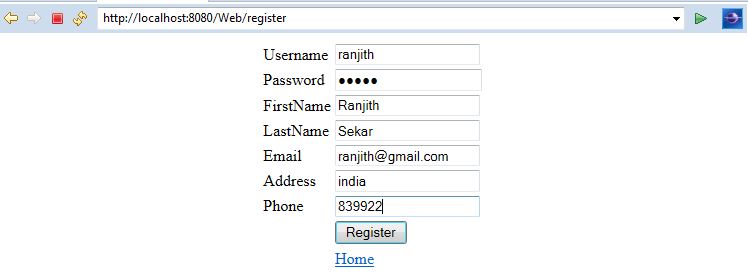
You will see the below outputs.
Home Page:

User Registration:
User Registration Success:

Login:

Login Success:
